Get paid To Promote at any Location
Showing posts with label Security. Show all posts

SteganographX Plus


With SteganographX you can hide a text in a bitmap image, the text will not be visible and the changes to the bitmap will not be noticeable in BMP's with 16, 24 or 32-bit colors.
The only way to extract the text out from the image is with SteganographX.
This version of SteganographX let you also encrypt the bitmap image with a secret key.

SteganographX is a portable application and like all other LeeLu Soft software, it is very simple and easy to use.

Changes in this version:
- Improved GUI
- Ability to encrypt the image
- Right click on the image open a popup menu
- Ability to hide the side bar
- Ability to drag and change the size of the text box
- Warning when closing without saving changes
- Smaller executable size

More information and help in the included Readme.txt file.

Website
Download

PicoCrypt 0.1.1


Platform Available: Windows 95/98/Me/2000/XP
Description

It is a small and extremely fast encryption utility that uses Blowfish encryption algorithm in CBC mode. It is easy to use and support multiple files drag-and-drop. In addition, it is portable, you can put it on your USB memory stick and run it anywhere you go! Very useful for users who want to keep their document secure on their computer or transfer over Internet using unsecure channel.

It uses a 128-bits key that is the MD5 message-digest of user password.

Running the utility

When you first run the utility, it will ask you for a default password. This default password will be later use for encrypting and decrypting all the files. If you want to use a different password for each file, then click "CANCEL" when prompted. You can set the default password later. Note: The default password and other passwords that you have entered, are not saved on any files on your computer system. They are immediately hash using MD5 hashing algorithm.

Encrypting a file


To encrypt a file, you can drag and drop the specify file icon on to the utility windows and click "Encrypt" when prompt for the required operation. Alternatively, you can click menu "File"->"Encrypt ..." to open a file dialog box for you to choose the file you want to encrypt.

If the encryption is successful, the status will show "Encrypted" text.

Decrypting a file

To decrypt a file, you can drag and drop the specify file icon on to the utility windows and click "Decrypt" when prompt for the required operation. Alternatively, you can click menu "File"->"Decrypt ..." to open a file dialog box for you to choose the file you want to decrypt.

If the decryption is successful, the status will show "Decrypted" text.
Important Notes

The utility will encrypt the file you specified. The file will be replaced with the encrypted version and no backup copy will be made. As such, please ensure that you have key in your intended password correctly, else the file will be lost forever.

Website
Download

Unlocker V1.8.8


Unlocker Assistant automatically launches if you are trying to delete/rename/move a file that is locked. When not in use, it stays in your system tray bar.

You may also like to check out Unlocker Portable for a portable package of Unlocker that is optimized for USB memory sticks.

Writes settings to: Application folder
Dependencies: Administrator rights

How to extract: Download the ZIP package and extract to a folder of your choice. Launch UnlockerAssistant.exe.

License: Freeware
System Requirements: Win2K / WinXP / Vista / Win7

Website
Download

Total Text Container V0.a082


Total Text Container is a personal information manager that lets you to store all kinds of different content within a single encrypted XML database, including rich text, images, spreadsheets, URLs/passwords, contacts, calender events, catalogs, files etc. Each item in the database is capable of supporting a mashup of content types, so you can store and view all related information on the same page easily.

Writes settings to: Application folder
How to extract: Download the ZIP package and extract to a folder of your choice. Launch TotalText.exe.

Stealth [?]: Yes
Unicode support: Partial. Support Unicode in document content but not in document filenames.

License: Freeware
System Requirements: WinNT / Win2K / WinXP

Website
Download

BleachBit quickly frees disk space, removes hidden junk, and easily guards your privacy. Erase cache, delete cookies, clear Internet history, remove unused localizations, shred logs, and delete temporary files. Designed for Linux and Windows systems, it wipes clean 70 applications including Firefox, Internet Explorer, Flash, Google Chrome, Opera, Safari, Adobe Reader, APT, and more.

Writes settings to: Application folder
How to extract: Download the ZIP package labelled 'portable' and extract to a folder of your choice. Launch bleachbit.exe.

License: GPL
System Requirements: WinXP / Vista / Win7

Website

Download

OperaPassView is a small password recovery tool that decrypts the content of the Opera Web browser password file (wand.dat) and displays the list of all Web site passwords stored in this file. You can easily select one or more passwords in the OperaPassView window, and then copy the passwords list to the clipboard and save it into text/html/csv/xml file.

How to extract: Download the ZIP package and extract to a folder of your choice. Launch OperaPassView.exe.

License: Freeware
System Requirements: Win2K / WinXP / Vista / Win7

Website
Download

"Blank And Secure" is a portable tool to securely delete the data.

Secure delete files are required to block the recovering of deleted data.

Secure deletion is possible with this program, because "Blank And Secure" overwrites the data with zeros before deleting.

The data recovery is impossible after this operation. So please only use if the data really should be permanently deleted.

The other overwriting standards such as US DoD 5220.22-M ECE, German standard and Peter Gutmann standard is not implemented, because in my test i had no measurable improvement, for that reason is that not implemented in "Blank And Secure" ;)

Download the ZIP package and extract to a folder of your choice. Create an empty file called 'BlankAndSecure.ini' Launch BlankAndSecure.exe.

License: Freeware
System Requirements: WinXP / Vista / Win7

Website

Download

Remove Fake Antivirus V1.61


Remove Fake Antivirus is used to remove fake antivirus progams which tend to be viruses or trojans.

Writes settings to: Application folder
How to extract: Download Remove Fake Antivirus.exe to a folder of your choice and launch.

Stealth [?]: Yes
License: Freeware
System Requirements: WinXP / Vista / Win7

Website
Download

PassworG is a password Generator/Tester.You can check the password strength of your own passwords, and then suggests how to improve it. With Generated passwords, you choose the allowed characters, length, number to generate, and whether to make the results 'readable'. It then gives you your possible passwords, plus their quality index (Bits).

How to extract: Download the ZIP package and extract to a folder of your choice. Launch PassworG.exe.

License: Freeware
System Requirements: Win2K / WinXP / Vista / Win7

Website

Download
KidSafe is a computer-locking application designed to keep young children from messing anything up. Ever had your desktop icons scrambled or your Word document deleted by a little kid? KidSafe's for you.

Writes settings to: Application folder

How to extract: Download the ZIP package and extract to a folder of your choice. Launch KidSafe.exe.

License: GPL
System Requirements: WinXP / Vista / Win7

Website
Download

ChromePass v1.05


ChromePass is a small password recovery tool that allows you to view the user names and passwords stored by Google Chrome Web browser. For each password entry, the following information is displayed: Origin URL, Action URL, User Name Field, Password Field, User Name, Password, and Created Time.
You can select one or more items and then save them into text/html/xml file or copy them to the clipboard.

ChromePass doesn't require any installation process or additional DLL files. In order to start using ChromePass, simply run the executable file - ChromePass.exe After running it, the main window will display all passwords that are currently stored in your Google Chrome browser.

Website
Download

PasswordFox is a small password recovery tool that allows you to view the user names and passwords stored by Mozilla Firefox Web browser. By default, PasswordFox displays the passwords stored in your current profile, but you can easily select to watch the passwords of any other Firefox profile. For each password entry, the following information is displayed: Record Index, Web Site, User Name, Password, User Name Field, Password Field, and the Signons filename.

System Requirements
This utility works under Windows 2000, Windows XP, Windows Server 2003, Windows Vista, and Windows 7. Firefox should also be installed on your system in order to use this utility.

PasswordFox doesn't require any installation process or additional DLL files. However, Firefox browser must be installed on your computer in order allow PasswordFox to grab the passwords list.
In order to start using PasswordFox, simply run the executable file - PasswordFox.exe
After running it, the main window will display all your passwords list for the last profile that you used. If PasswordFox chose the wrong profile folder, you can use the 'Select Profile Folder' option to choose the right one.

Website
Download

IE PassView is a small password management utility that reveals the passwords stored by Internet Explorer Web browser, and allows you to delete passwords that you don't need anymore. It supports all versions of Internet Explorer, from version 4.0 and up to 8.0.
For each password that is stored by Internet Explorer, the following information is displayed: Web address, Password Type (AutoComplete, Password-Protected Web Site, or FTP), Storage Location (Registry, Credentials File, or Protected Storage), and the user name/password pair. You can select one or more items from the passwords list and export them into text/html/csv/xml file.

IE PassView doesn't require any installation process or additional DLLs. In order to start using it, just copy the executable file (iepv.exe) to any folder like, and run it. After running iepv.exe, IE PassView scans all Internet Explorer passwords in your system, and display them on the main window.

IE PassView utility can recover 3 types of passwords:

* AutoComplete Passwords: When you enter a Web page that contains a form with user/password fields and a login button, Internet Explorer may ask you if you want to save the password, after pressing the login button. If you choose to save the password, the password is saved as AutoComplete password.
Be aware that some Web sites (like Yahoo login page) deliberately disable the AutoComplete feature, in order to avoid password stealing by other users.
* HTTP Authentication Passwords: Some Web sites allow the user to enter only after typing user and password in a separated dialog-box. If you choose to save the password in this login dialog-box, the password is saved as HTTP authentication password.
* FTP Passwords: Simply the passwords of FTP addresses (ftp://...)

Website
Download

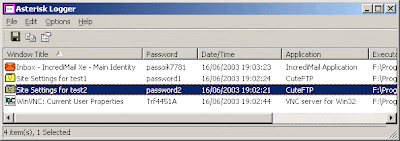
Many applications, like CuteFTP, CoffeeCup Free FTP, VNC, IncrediMail, Outlook Express, and others, allows you to type a password for using it in the application. The typed password is not displayed on the screen, and instead of the real password, you see a sequence of asterisk ('****') characters. This utility can reveal the passwords stored behind the asterisks in standard password text-boxes.
Asterisk Logger is a successor of AsterWin utility. It reveals the asterisk passwords in the same way as AsterWin utility, but it has some advantages over the previous utility:

* You don't have to press a button in order to reveal the asterisk passwords. Whenever a new window containing a password box is opened, Asterisk Logger automatically reveals the password inside the password-box, and add a record to passwords list in the main window of Asterisk Logger.
* Asterisk Logger displays additional information about the revealed password: The date/time that the password was revealed, the name of the application that contains the revealed password box, and the executable file of the application.
* Asterisk Logger allows you the save the passwords to HTML file and to 3 types of text files.

This utility works properly under Windows 9x, Windows ME, Windows 2000, and Windows XP. If you work on Windows NT, you should download the 'psapi.dll' and place it in your system32 directory. If you don't download this file under Windows NT, the Asterisk Logger utility will properly reveal the asterisk passwords, but it won't display the information about the application that contains the passwords. (Application and Executable File fields)

Except for Windows NT, this utility doesn't require any installation process or additional DLLs. Just copy to executable to any folder you want, and run it.
Under Windows NT, you can still use this utility without any additional DLLs, but the information about the application that contains the asterisk password won't be displayed. In order to display the application information under Windows NT, you have to download psapi.dll and put it in your system32 directory. If this file is already exist on your system, you don't need to overwrite it.

In order to reveal the passwords inside asterisk text-boxes, follow the instructions below:

1. Run the Asterisk Logger utility. The main window will appear, with no items in it.
2. Open the windows that contains the asterisk text-box you want to reveal. The password will be instantly revealed inside the password box, and in addition, a record containing the password and other information will be added to the main window of Asterisk Logger utility.
3. After you reveal all the passwords you need, you can select the desired passwords in the main window of Asterisk Logger, and save them into text or HTML file.


Website

Download

fSekrit


fSekrit is a small application for keeping encrypted notes.

The real advantage of fSekrit is that notes are truly self-contained; the editor program and your note are merged together into a tiny self-contained program file, removing the need to install a special application to view your data.

This makes fSekrit ideal for keeping encrypted notes on, for example, USB flash drives.

Another advantage of using fSekrit is that your un-encrypted data is never stored on your harddisk. With a traditional encryption utility you would have to decrypt your file to disk, view or edit it, and then re-encrypt it, and unless you use secure file wiping tools, it would be a trivial matter for someone to to retrieve your un-encrypted data, even though you have deleted it. This can't be done with fSekrit, though, since it never stores your un-encrypted data on disk.

fSekrit uses very strong encryption (256-bit AES/Rijndael in CBC mode) to ensure that your data is never at risk.

Self contained fSekrit note files are tiny! Only 60k plus the size of your text.

Website
Download


PINs is a free feature-rich Windows program for safe and comfortable storing of any secure information like passwords, accounts, PINs etc. PINs uses a secure 448 bit Blowfish algorithm to ensure the data are not crackable. The password used for securing access to stored data is not saved anywhere.

PINs does not require installation and does not need any special dlls, drivers or system files which can mess up your system. This means that PINs can run directly from floppy - including data files - without installing anything. This is extremely useful if you wish to easily access your data on other computers as well.

PINs is OSI Certified Open Source Software. It's freeware.

Selected features
* Secure 448 bit Blowfish encoding.
* Unlimited number of entries and data files.
* A clear tree-like data organization which allows logical grouping of systems and accounts.
* Automated login into Internet services (SuperPaste).
* A powerful random passwords generator.
* Safe files wiping using Gutmann, DoD and custom methods.
* Embedded hyperlinks launching.
* Unlimited in size, multi-line descriptions.
* A flexible data import/export in text format.
* Multiple user accounts on a single PC.
* Accounts sorting using any column as a sort criteria.
* Comfortable accounts adding, editing, and deleting.
* Compatibility with popular clipboard extenders.
* Passwords masking.
* Copy logins and passwords to the Windows clipboard.
* Find/find next functions.
* Expired passwords tracking.
* Running from a floppy without saving settings to registry.
* Multilingual versions.
* Full source code available.
* And more...

Website
Download

The Password Gorilla helps you manage your logins. It stores all your user names and passwords, along with login information and other notes, in a securely encrypted file. A single "master password" is used to protect the file. This way, you only need to remember the single master password, instead of the many logins that you use.

If you want to log in to a service or Web site, the Password Gorilla copies your user name and password to the clipboard, so that you can easily paste it into your Web browser or other application. Because the password does not appear on the screen, Password Gorilla is safe to use in the presence of others.

The convenience of Password Gorilla allows you to choose different, non-intuitive passwords for each service. An integrated random password generator can provide one-time passwords, tunable to various services' policies.

Password Gorilla is designed to be compatible with the Password Safe program, which was originally developed by Counterpane Labs, and is now maintained as an Open Source project at Sourceforge. All credit for the idea and the technology behind Password Gorilla belong to the authors and maintainers of Password Safe.

While Password Safe is an excellent piece of free software, it is only available for the Microsoft Windows platform. Password Gorilla is compatible with most major operating systems, including Apple Macintosh OS X and diverse flavors of Unix. If you work with more than just Windows, Password Gorilla allows you to access your password database anywhere.

No matter which operating system, Password Gorilla offers a few stand-out features, such as the merging of password databases. This is particularly useful if you have multiple copies of your database (e.g., at home and at work). Occasionally, you can then merge the two databases, collecting the updates you made on either end.

Also, Password Gorilla is an independent alternative to Password Safe. In the unlikely event that development of Password Safe is ever discontinued, you will still be able to use Password Gorilla to access your password database files.

Website
Download


Password Corral is our popular freeware password manager. With a clean, easy to use interface, strong encryption and all the features you would expect from a program you'd have to pay for, it's no wonder thousands of people have made it their choice for password management!

Please note, Password Corral runs on the Windows platform only.

Features
Password Corral uses Blowfish or Diamond2 encryption to encrypt all the information you store in the program, keeping it safe from prying eyes. Each password can have both a short description and comments which can also contain hyperlinks to launch your web browser. Each password entry can also have an expiration date to remind you to change the password. The program can be set to time out to the Windows system tray area after a specified period of system inactivity and be protected by your master password, so even if you forget to close Password Corral and walk away from your PC, your password information can still be protected.

The program is customizable, allowing you to display your password information unencrypted on the screen, change the display fonts and hyperlink color and modify many of the security aspects of the program. You can export your password data in an encrypted (or unencrypted) format to keep a safe backup of your data or to transfer your passwords to another PC. Best of all Password Corral features a clean, easy to use, standard Windows interface - no wild icons or weird dialog boxes - you'll be up and running as soon as you start the program!

* Clean, easy to use, standard Windows interface
* Secure Blowfish or Diamond2 encryption
* Multiple password accounts on a single PC
* Create detailed descriptions, usernames, URL, e-mail and comments for each password entry
* Group password data into custom groups you define
* Customizable random password generator
* Hyperlinks in the comments field will launch your web browser
* Password expiration notices
* Create encrypted export files of your password data for backup or import to another PC
* Customizable "time-out" feature to secure the program and your data after a period of system inactivity
* Print hard copies of your password information
* Many Customizable interface elements and security parameters
* Full on-line and "What's This?" help

Site Licensing
Password Corral is genuine freeware and is available at no cost.

Website
Download

Whether the answer is one or hundreds, Password Safe allows you to safely and easily create a secured and encrypted user name/password list. With Password Safe all you have to do is create and remember a single "Master Password" of your choice in order to unlock and access your entire user name/password list.

Security starts with you, the user. Keeping written lists of passwords on scraps of paper, or in a text document on your desktop is unsafe and is easily viewed by prying eyes (both cyber-based and human). Using the same password over and over again across a wide spectrum of systems and web sites creates the nightmare scenario where once someone has figured out one password, they have figured out all your passwords and now have access to every part of your life (system, e-mail, retail, financial, work).

Password Safe allows you to manage your old passwords and to easily and quickly generate, store, organize, retrieve, and use complex new passwords, using password policies that you control. Once stored, your user names and passwords are just a few clicks away.

Using Password Safe you can organize your passwords using your own customizable references—for example, by user ID, category, web site, or location. You can choose to store all your passwords in a single encrypted master password list (an encrypted password database), or use multiple databases to further organize your passwords (work and home, for example). And with its intuitive interface you will be up and running in minutes.

Oh, and the desktop version of Password Safe is freely available under an Open Source approved license.

Website
Download

Password Safe is a password manager that keeps all your passwords and personal data secure with 256-bit encryption. Access your passwords securely with Password Safe - a portable application which can be used from your PC or USB thumbdrive. Password safe is a great personal data management tool. One 'Master Password' is all that is needed to access all your passwords and personal information.

Use Password Safe to store:

* Web site passwords
* Credit card and PIN numbers
* Computer logon passwords
* Telephone banking codes
* E-mail passwords
* Software access passwords
* Door entry and alarm codes

Manage your passwords with Password Safe's secure access; drag and drop your KeePass compatible passwords to web pages and other software. Strong encryption keeps your information safe and secure.

Website
Download
top