Get paid To Promote at any Location
Showing posts with label Graphics. Show all posts

Bmp2Icon 1.0


With Bmp2Icon you can create your own set of icons based on images and pictures you like.
A Simple and easy to use utility, select the bitmap file, select the icon size (32x32 by default), click on convert and save your new icon file.

Freeware by LeeLu Soft

Download (single file, no install) 452kb: Here

SmillaEnlarger V0.9.0


SmillaEnlarger lets you enlarge a portion of your photo using a proprietary algorithm that results in smooth curves instead of blocky artifacts.

Writes settings to: None
How to extract: Download the ZIP package and extract to a folder of your choice. Launch SmillaEnlarger.exe in the SmillaEnlarger subfolder.
Stealth [?]: No. Writes a bunch of Qt cache entries to registry.
Unicode support: Yes

License: GPL
System Requirements: Win2K / WinXP

Website
Download

With SteganographX you can hide a text in a bitmap image, the text will not be visible and the changes to the bitmap will not be noticeable in BMP's with 16, 24 or 32-bit colors.
The only way to extract the text out from the image is with SteganographX.
This version of SteganographX let you also encrypt the bitmap image with a secret key.

SteganographX is a portable application and like all other LeeLu Soft software, it is very simple and easy to use.

Changes in this version:
- Improved GUI
- Ability to encrypt the image
- Right click on the image open a popup menu
- Ability to hide the side bar
- Ability to drag and change the size of the text box
- Warning when closing without saving changes
- Smaller executable size

More information and help in the included Readme.txt file.

Website
Download

Fotografix is an small image editor that can be used for graphic design, and basic drawing. Includes filters like "Sharpen", "Find Edges" as well as layers, channels, and masks. Paint and brush tools are included and supports a wide number of graphics formats including those of Photoshop and GIMP.

Writes settings to: Application folder
How to extract: Download the ZIP package and extract to a folder of your choice. Launch Fotografix.exe.
Unicode support: Partial. Saves its settings in ANSI including recent file paths.

License: Freeware
System Requirements: WinXP / Vista / Win7

Website

Download

clZoom is a simple utility that allows you to zoom in on your Windows desktop and magnify the pixels up to 16x. Supports multiple monitors, mouse wheel interface, automatic refresh on timer, and automatic preference and window position save.
Writes settings to: Application folder
How to extract: Download the ZIP package and extract to a folder of your choice. Launch clZoom.exe.
Stealth [?]: Yes
License: Freeware
System Requirements: WinNT / Win2K / WinXP / Vista / Win7

Website
Download

GetDiz is a fully featured text editor which can replace Notepad while maintaining an incredible speed, ease of use and small size. You can display and edit any text files with GetDiz. Additionally it offers enhanced functionality with DIZ and NFO files, which are often included in ZIP archives. GetDiz is able to display ASCII art correctly and save text, nfo and diz files as GIF images. The user interface is handy, small and specific. An optional USB-Stick installation is also possible.

Writes settings to: Application folder
How to extract: Download the installer and extract to a folder of your choice. All the necessary files are in the MAINDIR subfolder. Launch GetDiz.exe.
Stealth [?]: Yes
Unicode support: Partial. Unicode filenames are not supported.

License: Freeware
System Requirements: Win98 / Win2K / WinXP / Vista / Win7

Website
Download

JPEGView is a viewer/editor for JPEG, BMP, PNG, GIF and TIFF images. It is designed to view images from digital cameras full screen and with highest quality possible. Basic image editing functionality is provided - allowing to correct typical problems as color cast, high/low contrast and under- or overexposure very quickly and interactively during review of the images. JPEGView does not replace a full blown image editor - such an editor will just be needed less often.

Writes settings to: Application folder
Dependencies: gdiplus.dll is needed for Windows 2000.
How to extract: Download the ZIP package and extract to a folder of your choice. Launch JPEGView.exe.

Stealth [?]: Yes
Unicode support: Yes

License: GPL
System Requirements: Win2K / WinXP / Vista / Win7

Website
Download

Stellarium V0.10.4


Stellarium is a planetarium for your computer. It shows a realistic sky in 3D, just like what you see with the naked eye, binoculars or a telescope, with realistic atmosphere, sunrise and sunset. It features over 120,000 stars from the Hipparcos catalogue with associated information.
Stellarium Portable is a free, open source planetarium for your computer. It shows a realistic sky in 3D, just like what you see with the naked eye, binoculars, or a telescope. You can view the planets and gaze at the stars in stunning detail. Stellarium includes vivid illustrations of the constellations and a theatrical display of ravishing nebulae and galaxies. With Stellarium Portable, you can transform any computer into a stargazing centerpiece. Learn more

Writes settings to: Application folder
How to extract: Download the self-extracting EXE and extract to any folder of your choice.
License: GPL

System Requirements: Win95 / Win98 / WinME / WinNT / Win2K / WinXP / Vista / Win7

Website
Download

GFIE Pro is a powerful icon, cursor, animation and icon library editor. It opens and saves in ICO, CUR, ANI, PNG, XPM, BMP and JPEG formats. It is able to create icons and cursors up to 256x256 @ 32-bit, which can also be PNG-compressed for use in Windows Vista. It is also able to create animated cursors, extract icons and cursors from executable files and icon libraries, batch convert image files to icons or other image formats, supports advanced selection handling (marquee, lasso and wand tools, saving/loading selections from files), offers various gradient styles for filling shapes, and includes many filters such as Remove matte, Drop shadow, Inner/Outer glow and Bevel etc. Layer support with advanced selection handling makes it a really professional and unique freeware tool for designing small pixelgraphic images. GFIE offers high-quality filters like Bevel, Drop Shadow and Glow; supports editing animated cursors and managing icon libraries. It's lightweight (< 1.8 MB unzipped) and also has a portable version - just unpack it to your USB drive and use it anywhere. A clean, customizable, multilanguage user interface makes it really easy to learn and use.

Writes settings to: Application folder
How to extract: Download the ZIP package and extract to a folder of your choice. Launch gfie.exe.

Stealth [?]: Yes
License: Freeware
System Requirements: Win95 / Win98 / WinNT / Win2K / WinXP / Vista / Win7

Website
Download

ComicsViewer V1.41


ComicsViewer is an image viewer specially tailored to viewing scanned comics. It has a rotated view mode that allows you to view the images with your screen in portrait orientation. It is also able to directly display images stored in ZIP and RAR files without prior extraction.

How to extract: Download the ZIP package and extract to a folder of your choice. Launch ComicsViewer.exe.

License: Freeware
System Requirements: Win95 / Win98 / WinME / WinNT / Win2K / WinXP

Website
Download

JavaScript Animator Express v1.10


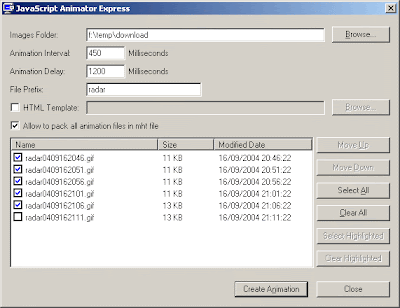
This utility allows you to easily create animation from image files (GIFs and JPGs) on your local drive. The animation is achieved by creating a simple HTML page with JavaScript animation, and running it on your default browser.

System Requirements
* 32-bit Windows operating system: Windows 9x/ME, Windows NT, Windows 2000, or Windows XP.
* Web browser with JavaScript support. (All Web browsers today supports JavaScript, unless you explicitly disable it)

Installing JavaScript Animator Express
This utility is a standalone executable, so it doesn't require any installation process or additional DLLs. In order to start using it, just copy the executable (jsae.exe) to any folder you want and run it. You can also use ZipInstaller to install this utility. If you do that, shortcuts to the program will be automatically be added to Start Menu and to your desktop, and a new entry will be added to the "Add/Remove Programs" module in order to allow you to easily remove this utility in the future.

Using JavaScript Animator Express
In order to create animation with this utility, follow the instructions below:
1. Type or select the folder that contains the images file you want to animate.
2. Optionally, you can type a file prefix if you want that only files starting with specific prefix will be displayed.
3. Select the image files that you want to add to the animation. You can also change the order of the files by using the "Move Up" and "Move Down" buttons.
4. Click the "Create Animation" button. The HTML page with your animation will be displayed in your default browser.

Website
Download

Artweaver – Portable Graphics Editor


Artweaver is a Free Portable Graphics Editor. The Image or Photo editing program offers many of the same artistic effects found in costly Photo Editors Like Photoshop. With the Artweaver Portable Photo Editor, you can create sketches from photos, use a wide range of brushes or pencils, apply lighting, blur and texture effects, sharpen images, and even add transparency or distortion.

If your familiar with Photoshop, You'll love Artweaver!

Website: artweaver.de

License: Freeware

Download

24×24 Free Button Icons is simply a compilation of Freeware icons created by Aha-Soft that can be used for personal or commercial use (see the readme in the zip for more info). Although not a portable app, you never know when these Icons might come in handy for an application or website. This is a nice simple set of icons that you can bring with you on your USB device and use when the time arises.

Website: Small Icons
License: Freeware
Download

PicPick 2.1.4


Synopsis: PicPick is an all-in-one software for software developers, graphic designers and home user. It features a powerful capture tool, image editor, color picker, color palette, pixel ruler, protractor, crosshair, whiteboard, screen capture etc.

Writes settings to: Application folder

How to extract: Download the ZIP package and extract to a folder of your choice. Launch picpick.exe.

Stealth [?]: Yes

License: Freeware

System Requirements: Win2K / WinXP

Download
Website

Thanks to www.portablefreeware.com

Synopsis: Photo to Sketch converts your photos to pen or pencil sketches, with a "freehand" mode for touch-up. This is the lite "version" of a commercial product.

Writes settings to: None

How to extract: Download the installer EXE and extract using Universal Extractor to a folder of your choice. The application files are found in the {app} folder. Launch the program by double-clicking on photo2sketch.exe.

Unicode support: No

License: Liteware

System Requirements: Win95 / Win98 / WinME / WinNT / Win2K / WinXP

Download
Website

Thanks to www.portablefreeware.com
top